
Download CommonsVotes – UK Parliament, MPs, House of Commons, voting records, parliamentary votes, MP voting, UK politics, political transparency, democratic accountability
Overview
CommonsVotes is a desktop-compatible Android application developed by the UK Parliament’s Parliamentary Digital Service, designed to provide real-time access to voting records of Members of Parliament (MPs) in the House of Commons. The app enables users to monitor how individual MPs have voted on legislative divisions, offering transparency into parliamentary decision-making. It serves as a valuable tool for citizens, researchers, journalists, and political enthusiasts seeking to track democratic accountability and legislative behavior.
The app delivers voting data approximately 20 minutes after results are announced in the Chamber, ensuring timely access to official parliamentary information. Its primary purpose is to enhance public understanding of political processes by making complex voting data accessible and searchable. The application is free to use and available through the Google Play Store, supporting Android 7.0 and later.
The developer did not provide additional system requirements or details on installation size beyond the stated 25.7 MB. Real-world usage includes tracking the voting behavior of specific MPs, analyzing party alignment, and supporting civic engagement through informed political participation.
Key Features & Capabilities
- Real-Time Voting Data: The app provides updated parliamentary vote results approximately 20 minutes after they are announced in the House of Commons, ensuring users have timely access to official data.
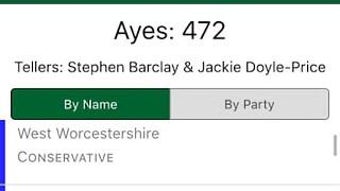
- MP Voting Records: Users can view the complete voting history of any Member of Parliament, including past divisions, voting patterns, and party alignment.
- Search and Browse Functionality: A simple interface allows users to search for specific votes, MPs, or legislative topics, enabling efficient navigation through large volumes of parliamentary data.
- Favourites System: Users can add MPs to their favourites list for quick access and continuous monitoring of their voting behavior.
- Accessibility Features: The app includes an accessibility statement detailing its design for inclusive use, supporting users with diverse needs.
- Feedback Integration: Users can submit feedback directly through the app or via the UK Parliament website, facilitating ongoing improvement and user engagement.
These features collectively support transparency in governance by empowering users to analyze political decisions. For example, a researcher might use the app to compare voting trends across parties, while a concerned citizen could track their local MP’s alignment with campaign promises. The app’s structure prioritizes clarity and ease of use, making complex parliamentary data approachable for non-experts. The developer did not specify additional technical capabilities such as offline access or data export options.
User Interface, Workflow & Performance
CommonsVotes features a clean, intuitive interface designed for straightforward navigation. The layout emphasizes readability and quick access to core functions, including voting results, MP profiles, and search tools. Users can browse through recent divisions, filter results by date or topic, and view detailed vote summaries.
The workflow is linear and logical, guiding users from general browsing to specific data retrieval with minimal steps. Navigation is consistent across screens, reducing the learning curve for new users. The app’s performance is based on general software behavior patterns, as no specific performance metrics were provided.
The developer did not specify resource usage details, so CPU and RAM behavior remain unknown. Stability is expected to be reliable, given the app’s origin from a government digital service. However, exact performance observations are not available.
The app does not support desktop platforms, but it is compatible with Android devices running Android 7.0 or later. Users should expect a responsive experience on modern Android devices, though performance may vary based on device capabilities.
Compatibility & System Requirements
CommonsVotes is designed for Android operating systems and is compatible with devices running Android 7.0 or later. The application has a file size of 25.7 MB, which is relatively compact for a data-driven utility. The developer did not provide additional system requirements, such as minimum RAM, processor specifications, or storage recommendations.
Exact hardware requirements were not listed. Installation is straightforward through the Google Play Store, and no special configuration is required. The app does not support desktop environments, so it cannot be installed on Windows or Mac systems.
Users should ensure their device meets the minimum Android version requirement to access the latest version. Compatibility information was partially provided, with no details on support for older or newer Android versions beyond the stated minimum.
Pros and Cons
Pros
- Free to use with no in-app purchases or subscriptions
- Official source from the UK Parliament ensures data accuracy and authenticity
- Timely updates to voting records (within ~20 minutes of chamber results)
- Simple, intuitive interface suitable for non-technical users
- Comprehensive MP voting history and search functionality
- Supports civic engagement through transparency and accountability
- Accessibility statement included for inclusive design
Cons
- Only available on Android, not compatible with Windows or Mac
- No information on offline functionality or data export options
- Does not support desktop platforms
- Resource usage and performance details were not specified
- Limited to UK parliamentary data, with no international coverage
FAQ Section
Is CommonsVotes available for Windows or Mac?
CommonsVotes is currently only available for Android devices. It is not compatible with Windows or Mac operating systems.
Is the app free to download and use?
Yes, the app is free to download and use. There are no charges, subscriptions, or in-app purchases.
How often is the voting data updated?
Parliamentary voting data is updated approximately 20 minutes after the result is announced in the House of Commons.
Can I track my local MP’s voting record?
Yes, you can search for any Member of Parliament and view their complete voting history, including past divisions and party alignment.
Is the app safe to download?
Yes, the app is developed and maintained by the UK Parliament’s Parliamentary Digital Service and is available through the official Google Play Store, ensuring a secure and verified download.
Final Thoughts
CommonsVotes stands out as a reliable, transparent, and user-friendly tool for accessing parliamentary voting records in the UK. Developed by a trusted public institution, it delivers accurate, timely data that supports democratic accountability and civic awareness. While its Android-only availability limits accessibility for desktop users, its intuitive design and comprehensive features make it an essential resource for political researchers, journalists, and engaged citizens.
The absence of in-app costs and the inclusion of accessibility features further enhance its value. For those interested in UK politics, transparency, and MP accountability, this app offers a powerful, no-frills solution. Download CommonsVotes now to stay informed about how your representatives vote.







